

Satisfactory
Server Hosting
Host your own Satisfactory server today. Whether you're building with friends or running a community, our powerful hosting makes it easy to get started. Fast, secure, and stress-free.

Satisfactory
Performance Plan · Instant Setup
4GB RAM
Perfect for 8 players
USD 0.00
per month
HALLOWEEN SALE
30% OFF All Server Plans
Use Code
Sale Ends In
Build Your
Perfect Plan
Configure your ideal Satisfactory server in minutes. Select player count, location and extras, then launch instantly.
Player Count
Select how many players you plan on playing with. All plans come with unlimited player slots.
Choose Your Plan
Configure your RAM, adjusting for more players if needed
Choose Your Location
Select the best datacenter for your players
Recommended for you
or choose from our 9 other regions
Enhance Your Server
Add extra features and performance boosts
CPU Boost
Comes with 5 performance cores
Backups
Comes with 3 configurable backups for extra protection
Dedicated Port
Port 7777
All addons are optional and can be changed later

Your Server
Ready to deploy
RAM
1GB
Location
...
Hardware
CPU
Coming Soon
Total Server Cost
USD 0.00USD/mo
Instant activation · 7-day refund
Explore Satisfactory Server Features
A tour of what comes with every Satisfactory server, and how it all works in the control panel.
AUTOMATIC BACKUPS
Never worry about losing your progress. Our automatic backup system ensures your server data is regularly saved. You can setup multiple automatic backups using our control panel.
Restoring one of these backups is just as easy, just select the backup you want to roll back to and click restore. Protect yourself from griefing, data loss or any kind of corruption.
DDOS PROTECTION & SECURITY
Protect your game server from bad actors, DDoS attacks and unauthorised access. We have worked hard to implement robust security measures to safeguard your server and data, giving you peace of mind while you play.
Our servers are equipped with advanced DDoS protection to ensure that we can mitigate high-level attacks on any of our game server’s no matter what plan you choose.
FULL FILE ACCESS
You have complete freedom over your server’s setup. We provide full SFTP access, so you can easily manage your files, install mods, add plugins, or make adjustments to your server’s configurations without restrictions.
On top of this we make it easy to make changes to any of your server’s files or settings directly within our panel. If there’s anything you’re having issues with you can reach out to our support team at any time.
INSTANT SETUP
Pay and play. Your server is provisioned automatically the moment payment clears, with the game, version and settings you picked already in place.
CUSTOM SUBDOMAINS
Every server gets a free yourname.wabbanode.com address, so nobody has to remember an IP and port. Change it whenever you like from the panel.
SERVER SPLITTING
Divide one plan into several smaller servers. Run a lobby and a survival world, or two different games, off the RAM you already pay for.
GAME SWITCHING
Swap your server to any game we host from the panel. Your plan stays the same, so a Minecraft server can become a Rust server next month without buying another.
DATABASES
Create MySQL databases from the panel for plugins, economies and stats. Credentials are generated for you and ready to paste into a config.
24/7 SUPPORT
Real people on live chat and tickets around the clock, replying in under five minutes on average. They play these games too.
AUTOMATIC CRASH DETECTION
If your server goes down, it comes straight back. A watchdog spots the crash, restarts the server and logs what happened.
One control panel to manage
every game server
Running a game server with your friends should be easy. That's why we built our own panel around simple, powerful tools that make sense the first time you open them.


Server locations around the world
Choose the location closest to you and your players at no additional cost. We're continuing to add new regions as our network grows.
12+
Locations
99.9%
Uptime


Utah, United States
Low latency for West Coast
What Our Customers Say
Real feedback from gamers who trust us with their server hosting needs
"My experience thus far with Wabbanode has been excellent. I am not a pro when it comes to tech or knowing exactly how to set up a server. The service has helped setup my se..."
Haunted
Minecraft player
"All of the workers assisting with server side issues are really nice and respectful, and are very quick to get things fixed or configured."
Curtis Hoare
Minecraft player
"Tabby was absolutely amazing and so dang kind and sweet, amazing customer service 10/10 prices are expensive but would come back again and again because of being treated so nicely"
Skymeria
Minecraft player
"I run a Minecraft community with their servers and Im really pleased. They have a decent panel which just works and the owner seems really knowledgeable and regularly giv..."
Rachel G
Minecraft player
"I currently have a project zomboid server with them and it has been running great over the last 2 months with mods. They also have good support which makes things very easy"
Beth
Project Zomboid player
"I love this site the support is the best i ever had and the server performance is so so good"
ACUL
Minecraft player
What is Satisfactory?
Satisfactory is a first-person, open-world factory-building game where players create complex production lines on an alien planet. The goal is to gather resources, automate processes, and build factories while exploring vast landscapes.
Focused on automation, resource management, and optimisation, the game offers a rewarding experience for crafting and engineering enthusiasts. For those looking to host their own server, our reliable performance and customisable settings ensure a smooth, cooperative experience with friends. Enjoy dedicated support for your Satisfactory server and create the ultimate factory empire together.
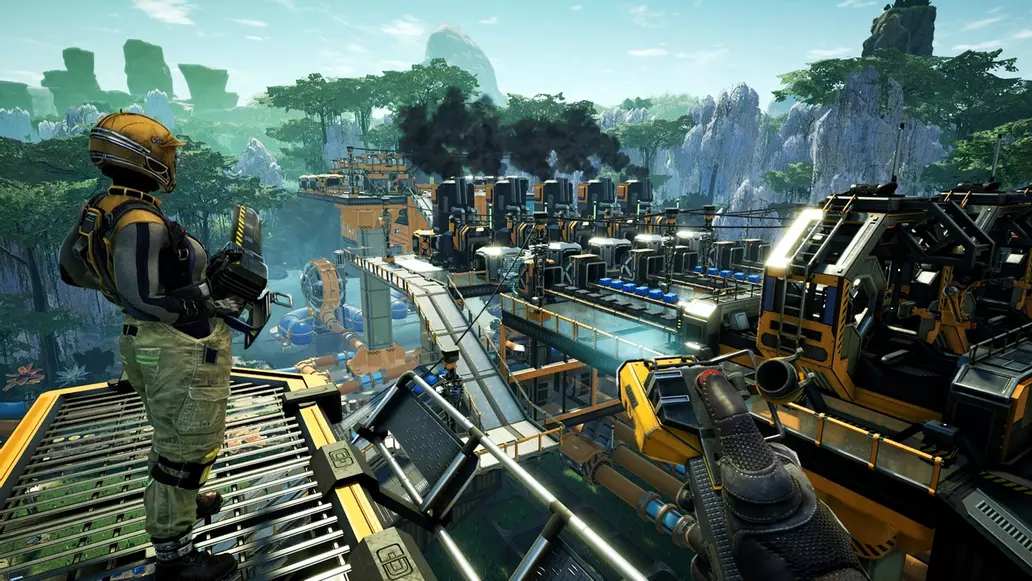
Best Satisfactory server hosting
Automate the planet on your own terms with a Satisfactory dedicated server. A dedicated host keeps your factory running and your world persistent, so you can host a Satisfactory server with friends and return to a base that never went offline. Wabbanode makes Satisfactory server hosting quick to launch and easy to manage.

What your Satisfactory server needs
For Satisfactory we suggest 3 GB for up to 4 players, 4 GB for up to 8 players, 6 GB for up to 16 players, 8 GB for up to 24 players and 10 GB for up to 32 players, the same sizes the plan picker above recommends. The Satisfactory dedicated server is fairly lightweight to start but grows with your factory. Satisfactory benefits from a strong single-thread CPU for simulating those sprawling factories, and NVMe storage keeps autosaves snappy. Bigger, more complex saves are the main driver of your Satisfactory server RAM needs, so leave room to grow.
Dedicated-server setup and co-op building
Running a dedicated server means no host bottleneck, everyone gets consistent performance and the world persists 24/7. With full file access you can tweak server settings, manage autosave frequency, and keep backups of that carefully engineered mega-factory. It is the ideal way to build ambitious projects with friends across different time zones.
Why host Satisfactory with Wabbanode
AMD Ryzen 9 hardware and NVMe SSDs keep even the largest factories simulating smoothly, while enterprise DDoS protection keeps you online. Free automatic backups, instant setup, and 24/7 support round out a hosting experience built for engineers.
Satisfactory server guides
Setup walkthroughs, admin commands and troubleshooting written by our team, so you can get your Satisfactory server running the way you want it.
How to Claim Your Satisfactory Server
Initial server setup by claiming and setting an admin password.How to Change the Server Name on Your Satisfactory Server
Customize your server's display name in the Server Manager.How to Manage Saves and Sessions on Your Satisfactory Server
Load different saves, switch sessions, and delete old data.How to Configure Auto-Save Settings on Your Satisfactory Server
Configure autosave interval and auto-save on player disconnect.How to Join Your Satisfactory Server
Connect to your Satisfactory dedicated server using the Server Manager.All Satisfactory Server Console Commands
Complete reference for server console commands.Satisfactory server hosting FAQs

















Need help
picking a plan?
Our team is online around the clock. Tell us what you want to run and how many players you expect, and we'll point you to the right plan.