
 Minecraft
Installing FTB Essentials, FTB Teams, and FTB Chunks adds handy commands, team play, and real chunk claims to a modded Minecraft server. FTB Essentials handles everyday commands like homes and warps, FTB Teams lets players group up, and FTB Chunks uses those teams to create the chunk claims that protect a base. They work together, but each does a different job, so it helps to know which one you need before installing.
Installing the Mods
- Navigate to the Wabbanode Control Panel, select your server, and stop it before making any changes.

- In the sidebar, click Add Content.
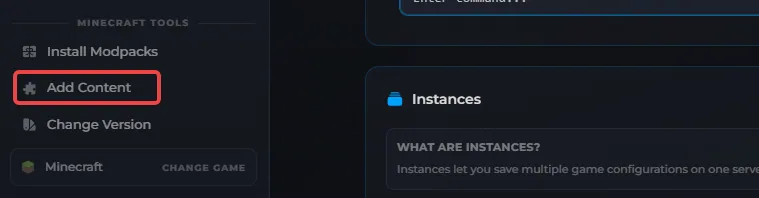
- Switch to the Mods tab, search for FTB Essentials, and click Install, then repeat the search and install for FTB Teams and FTB Chunks.

- Restart your server for the mods to take effect.
These mods only run on Forge, Fabric, or NeoForge servers, so vanilla or Paper/Spigot servers won't be able to install them.
Using FTB Essentials Commands
FTB Essentials adds a set of everyday commands that don't need any setup, they work as soon as the mod is installed. Here's the full list of FTB Essentials commands and what each one does:
| Command | What it does |
|---|---|
/sethome <name> |
Saves your current location as a home |
/home [name] |
Teleports you to a saved home |
/back |
Returns you to where you last died or teleported from |
/spawn |
Teleports you to the world spawn |
/tpa <player> |
Requests to teleport to another player |
/tpaccept |
Accepts a pending teleport request |
/setwarp <name> |
Creates a warp point (usually admin-only) |
/warp <name> |
Teleports you to a warp point |
Setting Up a Team With FTB Teams
FTB Teams groups players together so mods like FTB Chunks know who shares a claim. To create one, run:
/ftbteams party create <name>
Invite another player with:
/ftbteams party invite <player>
The invited player gets a prompt to accept. Beyond creating and inviting, most day-to-day team management, leaving, renaming, changing the team colour, happens through the in-game FTB Teams screen rather than a long list of chat commands, so players will usually find it faster to open that menu than to memorise more syntax.
Claiming Chunks With FTB Chunks
Once a team exists, FTB Chunks lets its members turn nearby chunks into chunk claims that protect their base.
- Open your inventory and click the blue-tinted map icon to bring up the chunk map.
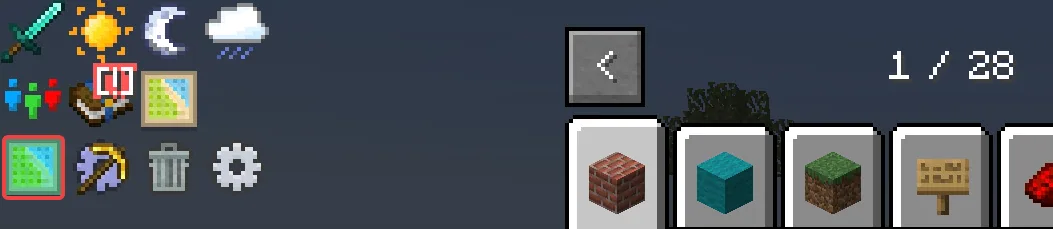
- Click a chunk to claim it, or click and drag across several chunks to claim them all at once.
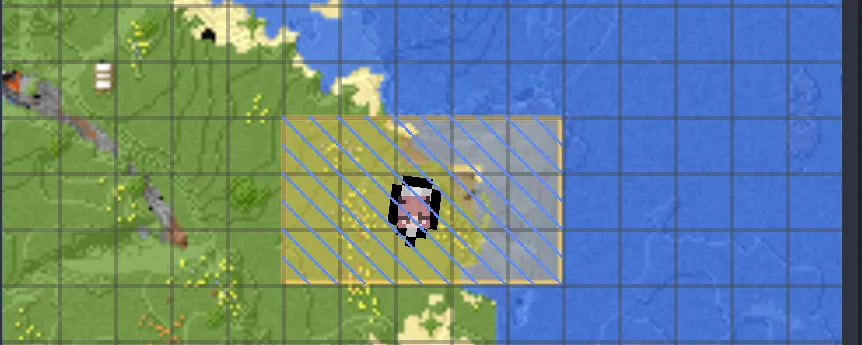
- Right-click a claimed chunk to release it, or drag while right-clicking to release several at once.
Claimed chunks are protected from other players and mobs breaking blocks, and anyone on the same FTB Teams team automatically shares access. The map screen also shows how many chunks you've claimed against your limit, since servers can cap how much a team is allowed to hold.
Keeping a Chunk Loaded While You're Offline
A claimed chunk still unloads like any other chunk once every player nearby logs off, which stops machines, farms, and pipes inside it from running. To keep a chunk active while you're away, hold shift and use the same click or click-and-drag action you'd use to claim it.
Force-loaded chunks have their own separate limit, shown in the corner of the map screen alongside your regular claim limit. Keep the whole of a multiblock structure or farms run inside the force-loaded area though, since anything that crosses the edge stops working the moment the chunk next to it unloads.
FTB Chunks needs FTB Teams installed to work, since claims are owned by a team rather than an individual player. Install both together rather than FTB Chunks on its own.
Using Open Parties and Claims Instead of FTB Chunks
FTB Chunks isn't the only claim system for a modded server. Open Parties and Claims is a popular alternative for Forge, Fabric, Quilt, and NeoForge servers that bundles its own party system and land claiming into one mod, so it can stand in for FTB Teams and FTB Chunks together rather than needing both.
Unlike FTB Chunks, it needs installing on both the server and each player's own client to work properly. In game, press the apostrophe key(') to open its claim menu, or use the /openpac-claims and /openpac-parties commands directly in chat. It also plugs into Xaero's World Map if your server runs that mod, showing claim borders right on the map.
It's still in beta, so test it on a spare world before rolling it out live. Install one claim mod or the other rather than both, since two systems both trying to protect the same chunks can conflict with each other.
Your server now has everyday player commands, a team system, and chunk claims set up and ready to use.
